
Best Smart Remote
Since the old universal remotes, Smart remotes have evolved which made people scour through long lists of codes. But, not now, the best smart remote can find the code for you and control several devices around the house.

What We Use
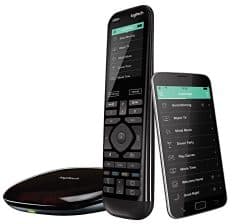
Logitech Harmony Elite
It’s the most advanced smart remote on the market, but it comes at a cost.
 Bestbuy.com | $299.99 | Buy Now |
 Amazon.com | $899.99 4 new from $1,229.95 2 used from $899.99 | Buy Now |
 Ebay.com | $349.99 out of stock | Buy Now |
Best Budget Option
SofaBaton U1 Universal
If you’re looking for a budget smart remote they don’t come much better than this.

| Ebay.com | $69.56 out of stock | Buy Now |
| Amazon.com | out of stock | Buy Now |
Runner Up
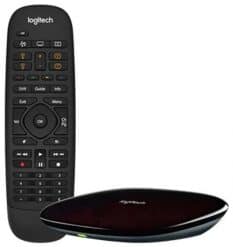
Logitech Companion
It smaller and more affordable Logitech remote control, but doesn’t keep up with the Elite.
| Bestbuy.com | $149.99 | Buy Now |
| Amazon.com | $434.00 6 new from $434.00 | Buy Now |
 Walmart.com | $149.00 out of stock | Buy Now |
| Ebay.com | $99.99 out of stock | Buy Now |
The Buyers Guide To The Best Smart Remote
Trying to find the best universal remote can be challenging; there are so many things you need to watch out for. Below is a guide to help you make the best decision:
Design
Smart remotes can replace multiple remotes around the house; this makes it one of the focal points of the living room. A stylish and sleek design doesn't just make it feel good in the hands, but it helps it blend into the room.
# of Devices
If you're planning to run your smart devices through one controller, then it's essential to know how many devices it can hold. This can vary from brand to model to the age of the smart remote, but it's definitely worth checking out.
Backlight
When you're relaxing to a movie but need to make adjustments, there's nothing worse than trying to find the right buttons in the dark. A backlight on the remote will stop you from pressing any buttons you shouldn't be pressing.
Features
Smart remotes can do so much more than turn up the volume and change the channel; universal remotes can control several entertainment devices. They can also include a feature like voice control, smart search, and much more.
Touchscreen Control
Touchscreen controls don't just look cool; they can make your life a hell of a lot easier. The comfortable layout makes it great to navigate around the remote, plus it usually has quick access control buttons for the essential devices.
Connection Type
Most smart universal remotes use a WiFi connection to work with other devices, but it's important to note, this is not always the case. Other connection possibilities are Bluetooth or through a smart home control center.
Table of Contents
The Best Smart Remote
You’re here because you’re looking for the best smart remote, and I can help you. Here’s a list of my top 5 smart remotes:
#1 – Logitech Harmony Elite Remote Control
WHAT WE USE
| Bestbuy.com | $299.99 | Buy Now |
| Amazon.com | $899.99 4 new from $1,229.95 2 used from $899.99 | Buy Now |
| Ebay.com | $349.99 out of stock | Buy Now |
It’s the universal remote I opted for, and it comes with two buying options, the Harmony Elite remote and the Harmony Elite remote with Roku.
You can connect the remote to Amazon Alexa, which opens up the possibilities for voice control.
The all in one remote can control up to 15 entertainment devices and various other smart products that lay around the house.
The full-color touchscreen allows you to see all of your viewing options while making it easy to control and edit your home devices.
Simply swipe and tap your way through the list to find music, TV, films, and more.
You can create one-touch activities; like when watching a movie, it turns on your speakers and dims the lights to create the perfect ambience.
It also features closed cabinet technology, which allows you to control the devices you can’t see.
Key Features
- Built-in rechargeable battery
- Connections: WiFi and Bluetooth
- 2.4-inch touchscreen
- Compatible with 270,000 devices
- Remote Dimensions: 2.13” x 1.14” x 7.56”
- Harmony mobile App
What Other People Say
They loved it, gone where the days of searching for codes to connect the devices to their remote. Now all you had to do was tell the remote the brand and model, and its extensive database would find the information for you. They put off the purchase for a while due to the price but regretted that decision in the end.


Upon looking through the reviews, you can see there is an apparent love for the remote. They felt the App took some getting used too but liked that everything was programmable. One feature that everyone loved was when the backlight came on after picking up the remote.
Final Verdict
The price is 100% on the high end of things, but it’s worth every penny. It allows you to make complicated actions based on specific triggers. Which for some people might seem like a useless luxury, but for me, it has been fantastic creating my own scenes.
The remote was very easy to set up once you’ve connected the first smart home device to the remote control; after that, it’s just repeating a process. If you have money to burn you won’t get a better universal remote than the Harmony Elite Remote.
What We Liked
- Nicely designed
- Great devices support
- You can use your phone
- Responsive touchscreen
What We Didn’t Like
- Expensive
- No HomeKit support
#2 – SofaBaton U1 Universal Remote
BEST BUDGET OPTION
| Ebay.com | $69.56 out of stock | Buy Now |
| Amazon.com | out of stock | Buy Now |
The SofaBaton can efficiently replace up to 15 household remotes.
It supports 500,000 Devices and 6,000 brands of smart home technology.
If any devices are added to the list, the remote automatically updates, so you don’t have to worry about a thing
This remote doesn’t use WiFi technology to connect to your smart home devices; instead, it uses Bluetooth and IR (infrared) to gain a connection.
Once everything is set up, you can set one-touch controls that control multiple command outputs from one button.
The universal remote has an OLED display, which is motion activated.
It displays the current status of the remote, along with possible control options.
To navigate the controls, you can use the unique scroll wheel. Or you can use your smartphone app to take control.
Key Features
- IR or Bluetooth connections only
- Compatible with 500,000 brands
- Can replace 15 remotes
- Macro button
- OLED display
- 12-month warranty
What Other People Say
The remote was excellent; they were pleased with their choice; they wanted something that could replace their “Plethora of remotes” lying around their home. The setup was easy due to the App; they had their first three devices up and running within 5 minutes.


Another customer had been looking for an affordable remote like this for quite some time. The App came in handy when they couldn’t find the remote. It was just a shame it didn’t come with a WiFi connection; it would have finished off the remote.
Final Verdict
It’s a great option if you don’t want to rely on a WiFi connection; the problem is a lot of smart devices need a WiFi connection to function. That being said, it still gives you great control of all your entertainment devices, and it’s cheaper than other brands.
The whole thing was easy to install and only took a couple of minutes to connect everything up. It’s got a vast database, so you don’t have to mess around with codes—overall, a tremendous smart remote with plenty of control functions.
What We Liked
- Easy programming
- Nice App
- Compact design
- Large database
What We Didn’t Like
- Small Screen
- Small spacing between keys
#3 – Logitech Harmony Companion All in One Remote
RUNNER UP
| Bestbuy.com | $149.99 | Buy Now |
| Amazon.com | $434.00 6 new from $434.00 | Buy Now |
| Walmart.com | $149.00 out of stock | Buy Now |
| Ebay.com | $99.99 out of stock | Buy Now |
The Harmony Companion is the less advanced and cheaper Harmony Elite.
You can connect it to Alexa to gain hands-free control of your smart devices.
This could mean turning your lights on and off, or specific smart devices on.
You also have the option of manual controls from either your smartphone or the Harmony remote.
The universal remote control can perform actions like lowering the blinds, dimming lights, and powering your TV.
It comes with cabinet control, which lets you use any devices that may be hidden out of sight.
This could be your Xbox or PS which is hidden inside or behind your cabinet.
Logitech Harmony is compatible with over 270,000 devices, including Sony TVs, Bose speakers, Philips Hue lights, and so much more.
The universal remote control is easy to set up and use, which is down to the fantastic App, which is available on iOS and Android.
Key Features
- Easy control
- Closed cabinet control
- Works with Alexa
- Turns your smartphone into a remote
- Supports 270,000 devices
- 50 favorited channels
What Other People Say
It was a great remote for their smart home; they had five remotes controlling various devices, which became a little confusing. They wanted something that would give them control from one localized point, and this remote done just that and so much more.


The main benefit for most users was, not having to use so many controllers. The setup felt daunting at first, but that fear was miss placed. It was incredibly easy. Their favorite part was being able to create a 15 step macro button for some crazy scenes.
Final Verdict
It’s not the perfect remote, but maybe I’m just being biased due to it not being a good as the Harmony Elite. I mean, it does do everything you need and a little bit more, and it’s $100 cheaper. The thing is, it felt pretty laggy in comparison.
The good part is you have plenty of devices that are compatible with the universal remote. Another benefit was the closed cabinet control. Overall it worked very well; it was just a shame it was laggy, but if you’re sold on Logitech, then this is an affordable option.
What We Liked
- Easy to setup
- Very responsive
- Updated regularly
What We Didn’t Like
- No dedicated off button
- Slow App
#4 – Caavo Control Center Smart Remote
| Bestbuy.com | $94.99 | Buy Now |
| Amazon.com | $299.99 1 used from $299.99 | Buy Now |
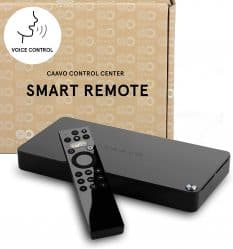
It’s one of the first AI-powered universal remotes; it was designed to make your life easier by controlling your smart devices from one place.
The control center uses advanced vision to create a powerful remote, which is simple for all to use.
You have a couple of buying options; you can go for the standard remote or the lifetime support version.
This opens up more possibilities like voice control, one search, TV Anywhere, and much more. You can also opt for a monthly plan, but over time this adds up.
By using the voice control option, you can ask the remote to play a specific channel, device, or movie.
And the one search option allows you to see all your viewing options from one place.
You can use the iOS App to control your TV if the remote is out of reach.