
Best Z Wave Hub
Everyone dreams of owning their own tony stark style house, and who can blame them? Imagine having your house doing daily tasks for you, like turning on your coffee machine in the morning. Or imagine getting home to a freshly ran hot bath

What We Use At Home
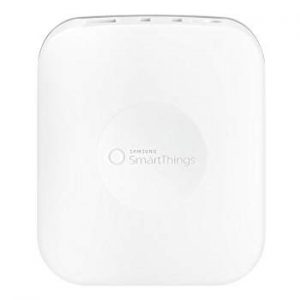
SmartThings Hub 2
I’ve been using this hub for a few years now, and honestly I haven’t had any major issues.
 Amazon.com Amazon.com | $189.99 2 new from $189.99 4 used from $149.00 | Buy Now |
 Ebay.com Ebay.com | $70.00 out of stock | Buy Now |
Best Z-wave Controller
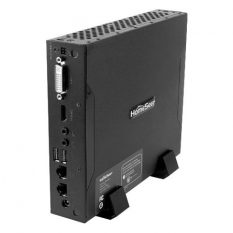
HomeSeer S6-PRO
People often get scared due to the price, but your get what you pay for and this is the best.
| Amazon.com | out of stock | Buy Now |
Best Beginner Hub
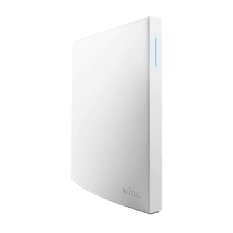
Wink Hub 2
Dues to the easiness of the hub it had to go as one of the top picks, especially if you’re a novice.
| Ebay.com | $50.00 | Buy Now |
| Amazon.com | $118.90 1 used from $118.90 | Buy Now |
 Walmart.com Walmart.com | $99.00 out of stock | Buy Now |
The Buyers Guide To Z-wave Hubs
The problem is it can feel a little bit overwhelming looking for the best z-wave smart hub. Smart home devices are becoming ever more popular.
Price
The Price can usually be the deciding factor for most buyers. Try to set yourself a budget before you start shopping.
The Connection
How the hub connects to WiFi is an important factor, especially if you have WiFi smart devices. Check out the connectivity before purchasing.
The App
Every app is different, and some are a lot better than other. If you struggle with technology getting a simple app design can be beneficial.
Additional protocols
Today we're talking about Z-wave controllers, but that doesn't mean they can't use other protocols. Check it out and see your options.
Easy Setup
With Some smart hubs it feels like you need to be a rocket scientist to set them. Try finding something easier if your not confident.
Battery Back-Up
When the power goes your smart home suddenly doesn't feel that smart. A battery pack will stop you getting locked out.
Warranty
With any electrical item you should also look at the Warranty they provide. The longer the coverage the better it is for you.
Alerts
Some smart hubs can send you alerts if anything is going on in your house. If security is important then so is this feature.
Table of Contents
The Best Z-wave Hubs
Still don’t know what to look for? Don’t worry it’s understandable, there’s just to many options available.
So, let me help you out; take a look at five best z-wave smart hubs on the market for your smart home:
| Samsung SmartThings Hub 2 | HomeSeer S6-Pro | Wink Hub 2 | Samsung SmartThings Hub 3 | VeraPlus-US | |
|---|---|---|---|---|---|
| MRSP | $58.00 | $959.97 | $199.00 | $56.80 | $99.95 |
| Setup Difficulty | Medium | Hard | Easy | Medium | Hard |
| Connection | Ethernet | Ethernet/Local | Ethernet/ Wireless | Ethernet/ Wireless | Ethernet |
| Battery Back-up | Yes | No | No | No | Yes (Not Included |
| Easy To Control App | Yes | Yes | Yes | No | No |
| Warranty | 1-Year | 30-day | 1-Year | 1-Year | 1-Year |
| Additional Protocols | Zigbee and WiFi | Wi-Fi, UPB and More | Zigbee, Kidde, Lutron Clear | Zigbee, Cloud to Cloud | Zigbee |
| Alerts | Yes | Yes | Yes | Yes | Yes |
| Buy | Find Best Price | Find Best Price | Find Best Price | Find Best Price | Find Best Price |
#1 – Samsung SmartThings Hub 2
WHAT WE USE
| Amazon.com | $189.99 2 new from $189.99 4 used from $149.00 | Buy Now |
| Ebay.com | $70.00 out of stock | Buy Now |
Smart homes need a brain to control all your devices, which is were the SmartThings 2 comes in.
Connect all your smart home devices by linking it to your Wi-Fi via the smart home hub — the device functions with a wide range of compatible devices.
By using the app, you can control the functions of your house from anywhere in the world, including lights, smart lock, and thermostats.
Set up notifications to let you know if anything is happening in your home.
Add some voice functionality by connecting your hub to Amazon Alexa to control your smart devices.
The SmartThings 2 hub powers from the wall, but in case of a power cut features a back-up battery pack. As for the protocols, you can use Zigbee and Z-wave devices.
All through the hub comes in a small size (4.9″ x 4.2″ x 1.3″), it comes with a powerful processor for faster reaction times.
Key Features
- Size: 4.9” x 4.2” x 1.3”
- Protocol: Zigbee and Z-wave
- Two USB ports
- Ethernet cable
- Alexa and google home voice activation
- Battery back-up
- 1 GHz ARM Cortex-A7
- FTTT compatible
What Other People Say
Everyone loved the smart home hub; even it was hard for a novice to set up. But, the technical nature meant it was very versatile and had plenty of options.
Another customer also said they had no troubles when it came to connecting their devices, no matter where they were in the house.


They also mentioned that the app worked excellently, and setting up routines was a doddle. And the integration with Amazon Alexa or Echo had no problems. The main problem was how hard it was to set-up, which made it harder for some to set-up routines. Once everything was running, there were no problems.
Final Verdict
Since I purchased the Samsung SmartThings Hub, I’ve had no severe problems. The set was challenging even for me, but with a little research, it’s easy to find the solution. Once I had everything set up, adding actions to the smart device was easy using the IFTTT extension.
The operating app is excellent; it’s very powerful and allowed me to control my home from anywhere in the world. If I was going to nitpick, I’ve had a few lost connections that maybe should have been avoided, but it’s nothing considering some other brands.
What We Liked
- Two USB one Ethernet ports
- Strong processor
- Battery backup
- Reliable
What We Didn’t Like
- Hard to set up
- No wireless
#2 – HomeSeer S6-Pro
BEST Z-WAVE CONTROLLER
| Amazon.com | out of stock | Buy Now |
HomeSeer allows technical smart home automation, with a fast and reliable connection. At the back of the machine, you’ll find two Ethernet ports, two USB ports, and one HDMI slot.
With this device, you can process the automation locally, but this means you can’t control your devices from anywhere in the world.
Unlike Wi-Fi operated home hubs, you don’t see the same delays with your z-wave devices; it’s fast and without fault. If your keen on security, this one is for you.
It stores all the information locally on there 120 GB storage; this means no cloud and less chance of being hacked.
Although you don’t have to connect to the internet, you still have the option.
This means you can gain control from anywhere, as long as you have a Wi-Fi connection. Create IFTTT recipes for more in-depth and technical home automation or add Alexa to gain voice activation.
Key Features
- Supports IFTTT
- Supports Windows plugins
- One-year warranty
- Can issue spoken/text alerts, announcements and reminders
- Works with Alexa and google home
- 4GB RAM
- 120 GB storage
- Size: 8"w x 6.5"d x 1.5"h
What Other People Say
After using the cheaper Vera brand, they decided it was time for a change. It was challenging to understand how it works at first. They feel it’s unrivaled for power; so far, they have only just scratched the surface.


It was easy to run and even easier to upgrade. Every upgrade, the home hub feels more stable and more secure. Overall they loved it; it was compact and very well designed and incredibly durable. They felt as if you couldn’t get anything better.
Final Verdict
Overall I was very impressed with the range of compatible devices, in fact, it was harder to find something that wasn’t compatible. I also found the system very powerful and highly reliable in its functionality; it enabled you to set up some complicated IFTTT recipes.
The biggest drawback for me was the outrageously high price, but you really do get what you pay for with this Z- wave controller.
It was very technical to set up, even for tech junkies, but a few YouTube videos will send you in the right direction. If you’re not feeling very confident, then something a little simpler might be the best option for you.
What We Liked
- Supports Z-wave, Zigbee and more
- Has an android and iOS app
- IFTTT channel
- Amazon Echo integration
What We Didn’t Like
- Costs a lot
- Difficult to set up
- Doesn’t look good
#3 -Wink Hub 2
BEST BEGINNER HUB
| Ebay.com | $50.00 | Buy Now |
| Amazon.com | $118.90 1 used from $118.90 | Buy Now |
| Walmart.com | $99.00 out of stock | Buy Now |
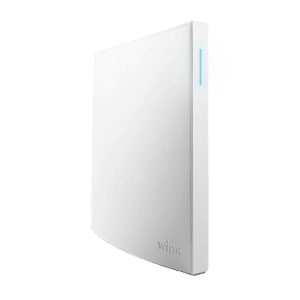
The Wink Hub 2 has a stylish design, which is about the size of a book (7.25″ x 7.25″ x 1.25″)
This enables the smart home hub to set proudly on any bookshelf.
Although you can connect the device wirelessly, it also features an Ethernet port around the back of the device.
You can connect to the Alexa home hub, which enables you to add voice control options to your smart home.
A nice update to the newer Wink hub is the updated application, which allows real-time monitoring app.
The original Wink app was severely lacking and very buggy.
It’s now easier than ever to navigate the interface. It can support around 130 devices and functions with IFTTT.
Using IFTTT allows you to trigger actions based on other actions taken around the house.
They use the following protocols: Bluetooth LE, ZigBee, Z-wave, Kidde, Lutron Clear Connect.
Key Features
- Supports 130 smart devices
- Voice control integration
- Easy to set up
- Size of a book
- Real-time monitoring
- Set up schedules
- Auto-discovery
- Protocols: Bluetooth LE, Z-wave, ZigBee, Kidde, Lutron Clear Connect
What Other People Say
A lot of people mentioned how much better the Wink 2 is compared to the original. Migrating the hub took 10 minutes, even with little experience. They also loved the new sleek design. It was stylish enough to have it in full view, which can’t be said with a lot of smart home hubs.


Another wrote that they loved the auto-discovery function on the Wink 2, it made pairing new devices that much easier.
Some people did have trouble with compatible devices when upgrading to the new hub there old smart devices wouldn’t sync up. The biggest flaw was the lost connection; it happened far too often for some people.
Final Verdict
Since the first-gen home hub was released, the Wink 2 has seen several updates; An added Ethernet port for wired connection. And most importantly, the much need security update, considering their lousy past this was the most vital upgrade.
They also upgraded the look by giving it a more stylish design. The Wink app is impressive, it’s far superior to other available applications. One downside is the lack of USB ports; it means you can’t wire in devices.
One last thing to note is the hub should be no more than 15 ft from the wireless router for the best connection.
What We Liked
- It was easy to set up
- Voice control
- Great app design
- Auto-discovery
What We Didn’t Like
- No USB ports
- Not cheap
- Slower response time
#4 – SmartThings Hub 3
 Bestbuy.com Bestbuy.com | $69.99 | Buy Now |
| Amazon.com | $539.97 1 new from $539.97 7 used from $289.90 | Buy Now |
| Walmart.com | $69.99 out of stock | Buy Now |
| Ebay.com | $66.99 out of stock | Buy Now |
The 3rd gen Samsung SmartThings hub has seen wireless connectivity added to the hub.
Which means no more relying on a wired connection, it can be set up anywhere within range of the Wi-Fi.
It’s seen a downgrade in the number of USB ports; you now have one instead of the previous two slots.
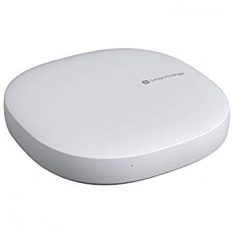
The pure white smart home hub is 5″ x 5″ x 1.2″.
SmartThings features an LED light at the front of the hub
This feeds you with information regarding the home hub’s connectivity status.
At the back of the hub, to keep the wires hidden, you have an Ethernet port, USB slot, and the powerpoint.
Set up schedules based on your daily routines and needs.
You also have the option of setting up 24/7 application alerts to let you know if anything happens with no monthly fees.
The Samsung SmartThings hub 3 is compatible with all your previous smart devices, so you don’t have to worry about purchasing more.
Key Features
- 50-130 ft range (depends on your house)
- Supported with Zigbee 3.0, Z-Wave, Cloud-to-Cloud and more
- 1 USB port