
Wink Vs SmartThings: Battle Of The Hubs
Smart homes depend on a central hub to establish online connections for their smart devices.We’re going to be taking an in-depth look at why these two smart hubs are the best on the market.

Challenger #1
Wink Hub 2
The second-generation Wink is found in thousands of homes, but how will it hold it up?
 Ebay.com | $50.00 | Buy Now |
 Amazon.com | $118.90 1 used from $118.90 | Buy Now |
 Walmart.com | $99.00 out of stock | Buy Now |
What We Use At Home
SmartThings 2
I brought this model a few years ago, due to the power. Will I be upgrading?
| Amazon.com | $189.99 2 new from $189.99 4 used from $149.00 | Buy Now |
| Ebay.com | $70.00 out of stock | Buy Now |
Challenger #2
SmartThings 3
This is Samsungs 3rd generation smart hub. But is it worth the upgrade?
| Amazon.com | $539.97 1 new from $539.97 7 used from $289.90 | Buy Now |
| Walmart.com | $69.99 out of stock | Buy Now |
| Ebay.com | $69.99 out of stock | Buy Now |
What We Use At Home
| Amazon.com | $189.99 2 new from $189.99 4 used from $149.00 | Buy Now |
| Ebay.com | $70.00 out of stock | Buy Now |
I personally already own the 2nd gen SmartThings hub which, performs excellently and is more than capable of powering any smart home.
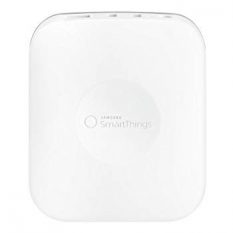
The SmartThings 2 enables you to control a wide range of devices, using the nicely designed App.
The device has two USB ports along with an Ethernet port at the rear, which is used to connect your hub online.
Teach your house new tricks using Alexa voice control functions.
If the power goes out, you have a backup battery pack with four AA batteries.
The Hub can use Z-wave and Zigbee protocols, operating at a range of 50-130 ft.
Because you plug the smart hub directly into the router, you rarely encounter loss of connection.
The SmartThings Hub 2 uses a 1GHz ARM Cortex-A7, 256MB DDR RAM, and 4GB FLASH Setup to provide seamless IFTTT actions.
Key Features
- IFTTT compatible
- Two USB ports
- Supports over 200 smart devices
- Supported with Z-Wave and Zigbee
- Real-time monitoring
- Alexa voice integration
- Battery Back-up
- 50-130 ft range
How it Served Me
Since I purchased the SmartThings Hub its performed amazingly, I’ve experienced a couple of lost connections but, nothing to shout about.
It can be tricky to set up the actions, especially if you’re a novice, but as you work your way around the app, it becomes easier to set up operations.
There’s a wide range of compatible devices, so you very rarely have trouble finding the right accessories. The SmartThing community is always eager and constructive to help you find the right solution.
Once you get used to the app, it’s nicely designed, enabling multiple IFTTT functions at the touch of your fingertips. Lastly, the security functions are the top of the range.
What We Liked
- Two USB ports
- Powerful app
- 256MB DDR RAM
- Battery Back-up
What We Didn’t Like
- No wireless capabilities
- Only Supports Zigbee & Z-wave
Wink Hub 2 vs. SmartThings Hub 3
It’s a question I hear all the time from people thinking about starting a smart home. But the answer isn’t as simple as the question.
To help you make your decision, I’m going to give you an in-depth look at smart home hubs to see which one will come out on top. So, which one will win in the SmartThings vs. Wink hub 2 smart home battle?
Before we get started with the comparison, I think it’s important we know a little bit more about each smart hub.
Let’s start with the Wink 2 hub:
| SmartThings 2 | Wink 2 | SmartThings 3 | |
|---|---|---|---|
| Drive | 1GHz ARM Cortex-A7 | N/A | 528 MHz ARM Cortex |
| Devices | Unlimted | 400 | 230 |
| Connection | Ethernet | Ethernet & Wireless | Ethernet & Wireless |
| Memory | 512MB DDR3 RAM | 512Mb | 256MB DDR RAM |
| Size (Inches) | 4.9″ x 4.2″ x 1.3″ | “7.3” x 7.3″ x 1.25″ | 5″ x 5″ x 1.2″ |
| Protocols | Z-Wave, Bluetooth, and Zigbee | Bluetooth LE, Z-Wave, Kidde, Zigbee, and more | Z-Wave, Bluetooth, and Zigbee |
| Battery Back-up | Yes | No | No |
| Live Video Linking | Yes | No | Yes |
| IFTTT | Yes | Yes | Yes |
| Buy | Find Best Price | Find Best Price | Find Best Price |
Wink Hub 2
Challenger #1
| Ebay.com | $50.00 | Buy Now |
| Amazon.com | $118.90 1 used from $118.90 | Buy Now |
| Walmart.com | $99.00 out of stock | Buy Now |
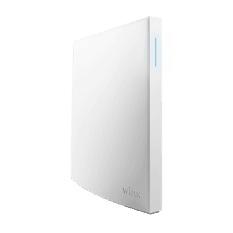
The pure white Wink hub 2 looks beautiful at all times of the day.
In the morning, you have a sleek self-standing unit that suits any home, while at night, it casts a gorgeous blue light.
Their wink 2 hub is slimmer than the original version, yet still enables users to connect all their smart home devices without any issues.
Add that to the Wink Hub 2’s integration with IFTTT (If This Then That).
This allows you to trigger actions based around other devices; you can unlock the door and turn the lights on at the press of a button.
The new Wink Hub 2 features a nearly added Ethernet port; this enables you to hardwire the device to the router.
This gives you far more options than the original version.
If you have a terrible Wi-Fi connection, then wiring your Wink Hub to the router is a great option.Users can also set up scenes based on their location or the time of the day.
Key Features
- Alexa voice integration
- Google home integration
- Supports 130 smart devices
- Supported with Bluetooth LE, Z-Wave, Kidde, Zigbee and more
- Real-time monitoring
- IFTTT compatible
- Simple enough for beginners
- Wired Ethernet and Wi-Fi connectivity (2.4 Ghz, 5 Ghz)
What Other People Say
It worked far better than the original Wink; it was faster and loaded without delay. Users also thought the setup was simple enough for a novice to set up without any issues.
And the integration to Alexa was just as easy. The trouble was devices struggles to stay connected at a distance.


Another issue people had with the Wink hub was the new Schlage Connect Deadbolt wasn’t fully compatible.
You could open and close the lock, but the user codes didn’t function (definitely an area they need to improve). They did regain some love with the excellent app.
Things We Like
It only took a few minutes to set up, and the thin white design is very sleek to look at. The Wink hub is compatible with multiple protocols, including Z-wave and ZigBee. It even works with some of the less popular networks.
Paring your smart devices couldn’t more accessible. The smart home hub allows you to pair your devices using the App; Simply press the button and follow the video tutorial. If you’re not using the Wink App, all you have to do is push the pairing button until light flashes twice.
We liked how the Wink App worked; it had a simple design that functioned well. And with the IFTTT integration, it enabled you to set off a chain of events to suit your needs.
Things We Don't Like
The wink hub 2 no USB ports within the unit, which means users can’t add additional devices wired devices to your smart home.
And although Wink Hub 2 boasts of being compatible with over 130 devices, you can still run into trouble. Some of your old devices may not be suitable unless it clearly states to be a Wink compatible device. This can lead to nightmares and empty wallets if they can’t sync up with your Wink hub.
Finally, although the Wink App was very nicely presented and had some neat functions, overall, it was buggy compared to other systems. And at times, lost connection or the pairing timed out.
Requirements
- Wi-Fi connection with 2.4GHz router
- Wink App
- Apple or Android device
- Alexa (optional)
Final Verdict
It’s a great addition to the newbie; the simple design and the easy to install features make it an excellent place for the beginner to start. Even for smart home veterans, the Wink Hub 2 has enough power to automate your house.
Since the original Wink Hub, the second-gen has since seen several improvements, the sleek design is more capable and has better features. And more importantly, the security has been dramatically improved since the Wink was first released.
And finally, the Wink app smashes all competition out of the park, is usability is unrelieved. If you have the original Wink hub, it’s defiantly worth the upgrade!
What We Liked
- Easy to set up
- Functional App
- Auto discovery
- IFTTT & Alexa
What We Didn’t Like
- No USB ports
- Expensive
- No LIFX
- Slow response time
Samsung SmartThings 3
Challenger #2
| Amazon.com | $539.97 1 new from $539.97 7 used from $289.90 | Buy Now |
| Walmart.com | $69.99 out of stock | Buy Now |
| Ebay.com | $69.99 out of stock | Buy Now |
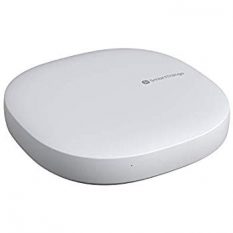
The slim SmartThings hub might no look noticeably smaller, even though it is.
But, one noticeably smaller thing is the price.
Unlike the previous SmartThings model, you can connect Wirelessly to control 200 smart home devices at the touch of a button.
It may lack the original battery pack, but each device is connectable between 50-130 ft, It depends on the layout of your house.
Their smart home hub provides you with large scale third party integration and gadget support from over 40+ brands.
Make your life easier by teaching your SmartThings hub your daily routine. You can have your coffee machine connected to your alarm; the possibilities are endless.
To make your life easier, you can set up voice controls to enables you to command your devices using Alexa and Google Assistant.
You can also receive 24/7 monitoring alerts via the SmartThings App. If there’s any unexpected activity, you’ll know about it.
Key Features
- 50-130 ft range (depends on your house)
- Supports 200 devices
- IFTTT compatible
- New Smartphone App to setup (you can continue to use the old one once the setup is complete)
- Alexa & Google Assistant
- 1 USB port
- Video linking
- Supported with Z-Wave, Zigbee 3.0, Cloud-to-Cloud and more
What Other People Say
The SmartThings hub worked great for most people, although it was harder to set up then the wink. The added Wi-Fi capabilities are a great addition.
It made controlling their devices more comfortable. But the new SmartThings App let them down. It was unreliable and missing features from the old APP.


Once set up, the SmartThings hub is more than capable of powering the users’ entire house with plenty of devices, but it does feel more like a downgrading version rather than an update.
Overall they thought it functioned well but hated the SmartThings App; luckily, after installation, you can still your the old app.
Things We Like
The Wi-Fi compatibility made installing the smart home hub to all of it’s of devices, with my second gen I have to manually connect each device. It also works with Zigbee and Z-wave devices.
It was also nice to see that all the previous SmartThings devices worked with both Smart hubs; it could end up saving you a lot of money.
With the amount of device the SmartThings hub can control and the IFTTT compatibility you can now automate more devices than most of the other Smart hubs.
Things We Don't Like
Some of the aspects around the 3rd gen SmartThings have improved but on others they have removed previous features. This includes the back-up battery back, which means none of you devices work if the power goes.
Although this isn’t to much of a problem if all your devices are hardwired; none of them would be working anyway. The downside to it is that means no smart home monitor security.
And that’s not the only downside, inside the SmartThings hub you’ll find a 528 MHz ARM Cortex-A7 processor (half the size of the V2’s 1GHz ARM Cortex-A9 processor).
Requirements
- Wi-Fi connection with 2.4GHz router
- Samsung's SmartThings App
- Apple or Android device
- Alexa/Google Assistant (optional)
Final Verdict
The SmartThings 3rd Gen is still a powerful piece of kit, even with the reduction in processor speed and RAM. This just means you cannot control as many devices, but 200+ is more than enough.
The loss of the battery pack doesn’t seem like an issue to me. Although it does help when if there’s a power cut, if you don’t have a key back-up, you might be stuck outside until the power comes back on.
And the Wi-Fi Addition is a nice touch, which makes it easier to set up and control all of your devices. But, overall, it’s not worth upgrading to the newer unit unless you have to. The benefits don’t warrant the purchase or the time we configuring.
What We Liked
- Great Price
- Highly compatible
- Allows live feeding
- Quick response time for alerts
What We Didn’t Like
- No worldwide coverage
- Loss of battery
- Half the processor power
- The new app has a lot of teething problems